Open-source face detection

Detect every face with pinpoint accuracy

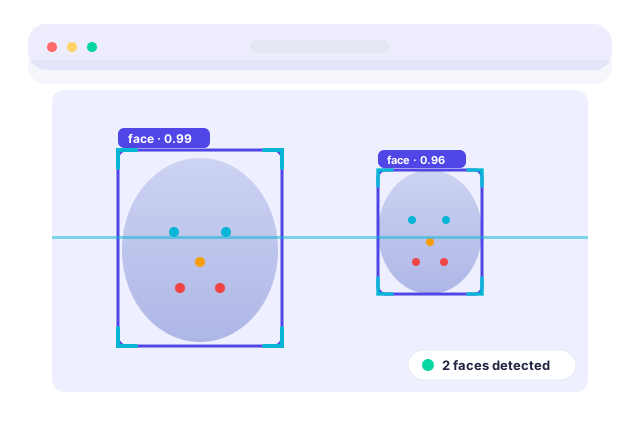
RetinaFace is a fast, lightweight face detector that locates faces, marks five facial landmarks and scores its confidence — on small, blurry or angled faces other tools miss. Free to download for Windows 11, macOS and Linux.
100% free & MIT licensed No account required Runs offline
RetinaFace detecting faces with bounding boxes and landmarks
38 ms / frame 5 landmarks

Trusted by builders at

Universities Dev teams Research labs Startups Educators
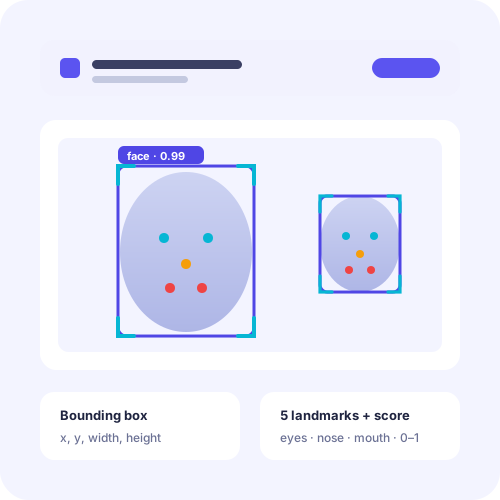
How RetinaFace locates and maps faces in an image
About the software

A face detector built for the hard cases

RetinaFace is an open-source face detection tool that answers one question reliably: where are the faces in this image? Instead of just drawing a box, it pinpoints five key facial landmarks and attaches a confidence score to every result, so you always know how sure the detector is.

It was created because everyday detectors struggle the moment faces get small, turn sideways or blur in motion. RetinaFace was designed to stay accurate exactly there — in crowds, security footage and candid photos — while remaining light enough to run on an ordinary laptop.

  • What it is — a single-stage face detector returning boxes, landmarks and confidence in one pass.
  • Who it's for — students, developers, researchers and educators who need dependable detection without a steep setup.
  • Why it exists — to make accurate face detection on difficult images free, open and easy to run anywhere.
Features

Everything you need for reliable detection

Nine reasons RetinaFace has become a go-to choice for face detection across teaching, research and production work.

Pinpoint accuracy

Finds small, side-on and partly hidden faces that lighter detectors routinely skip.

Five facial landmarks

Returns eyes, nose tip and mouth corners for alignment, pose and effects.

Confidence scoring

Every detection carries a score so you can filter out anything uncertain.

Real-time speed

Lightweight enough for live webcam detection, frame after frame.

Cross-platform

One detector, identical results on Windows 11, macOS and Linux.

Optional GPU boost

Add a CUDA GPU to speed up real-time and batch workloads.

Crowd ready

Detects every face in a frame in a single pass, even in busy scenes.

Privacy friendly

Runs fully offline after setup, so images never leave your machine.

Open & free

MIT-licensed and auditable, with no fees, accounts or hidden limits.

Download

Get RetinaFace free

The latest stable build, ready for Windows 11, macOS and Linux. No sign-up, no payment.

RetinaFace 2.4.1

The full toolkit — detector, pre-trained weights and a no-code demo app so you can confirm detection works the moment it opens.

Virus-scanned · open-source · safe to install

Release details

Version2.4.1
DeveloperRetinaFace Project
Operating systemWindows 11 / 10, macOS, Linux
LicenceFree · Open Source (MIT)
File size86 MB
Last updatedJune 2026
Installation guide

Up and running in four steps

From download to your first detection, RetinaFace installs in minutes — no machine-learning background required.

Download the package

Grab the latest RetinaFace build for your operating system from the download section above. The file is about 86 MB.

Install or unzip

Run the installer and follow the prompts, or unzip the portable build into any folder you like — no admin rights needed for the portable version.

Open the demo app

Launch RetinaFace and let it cache the model weights on first start. This one-time step prepares the detector for fast results.

Run your first detection

Drop in an image or enable your webcam. RetinaFace draws boxes and landmarks and shows a confidence score for every face it finds.

How it works

One pass, three outputs

RetinaFace processes the whole image at once and hands back exactly what downstream tasks need.

Input image

Feed a photo, a frame or a live webcam stream into the detector.

Single-stage scan

The model scans the full frame once, no slow multi-step pipeline.

Boxes + landmarks

Each face gets a bounding box and five precise landmark points.

Confidence score

A score per face lets you keep strong detections and drop the rest.

Compatibility

Where RetinaFace runs

Tested across desktop platforms and common hardware so you know what to expect before you download.

PlatformMinimumRecommendedStatus
Windows 11 / 104 GB RAM, dual-core CPU8 GB RAM, CUDA GPUFull support
macOS 12+4 GB RAM, Apple silicon or Intel8 GB RAM, Apple siliconFull support
Linux (Ubuntu / Debian)4 GB RAM, x86-648 GB RAM, NVIDIA GPUFull support
Older 32-bit systemsNot availableLimited
Pros & cons

An honest look

No tool is perfect. Here is where RetinaFace shines and where you should plan ahead.

Strengths

  • Excellent on small, blurry and angled faces
  • Five landmarks plus confidence, not just a box
  • Free, open source and easy to set up
  • Runs offline on Windows, macOS and Linux

Things to plan for

  • Detects faces only — it does not recognise identity
  • Heavy batch video benefits from a GPU
  • First run is slower while weights are cached
  • No support for legacy 32-bit machines
Use cases

What people build with RetinaFace

Attendance & access

Spot and align faces at entrances or in classrooms before a recognition step takes over.

Photo organisation

Auto-detect faces to group, crop or tag large photo libraries quickly.

Research datasets

Extract and align faces at scale to prepare clean training data.

Camera & AR effects

Use the landmarks to anchor filters, masks and live overlays in real time.

Safety & monitoring

Count and locate faces in busy footage for crowd and safety analytics.

Teaching computer vision

A hands-on, free tool for students learning how detection really works.

Troubleshooting

Quick fixes for common snags

Most issues clear in a minute. For deeper help, see the troubleshooting guide.

Detector won't start on first launch

Let the first run finish caching the model weights, and make sure your antivirus isn't blocking the app folder. Reopen RetinaFace once caching completes.

Detection feels slow

Switch to the MobileNet backbone, lower the input resolution, or enable a CUDA GPU. Each option trades a little accuracy for noticeably faster frames.

Too many false positives

Raise the confidence threshold — try 0.8 instead of 0.5. Detections below the threshold are dropped, which removes most weak matches.

User reviews

Loved by builders and teachers

Rated 4.8 out of 5 across 1,742 reviews.

“It handled a crowded lecture-hall photo that two other detectors gave up on. The landmarks saved me a whole alignment step.”

AODr. Amara OkaforCV researcher

“Installed the portable build on a locked-down lab machine in under five minutes. My students were detecting faces the same afternoon.”

MLMarcus LeeCS lecturer

“The confidence score is the feature I didn't know I needed. Threshold at 0.85 and my false positives basically vanished.”

PNPriya NairBackend developer
FAQ

Frequently asked questions

Twenty answers covering setup and everyday detection. Still stuck? Reach the team at info@retinaface.com.

General & Setup

Yes. RetinaFace is completely free and open source under the MIT licence. You can download, use, modify and ship it in personal or commercial projects at no cost.
RetinaFace runs on Windows 11 and 10, macOS 12 or newer, and most modern Linux distributions. The same detection model works identically across all three.
No. RetinaFace runs on a standard CPU for images and light video. A CUDA-capable GPU is optional and mainly speeds up real-time and batch workloads.
The standard package is around 86 MB, which includes the detector, the pre-trained weights and a small demo app so you can test detection immediately.
The installer registers RetinaFace on your system, while the portable build runs from a folder with nothing to install — handy for USB drives or locked-down machines.
Only for the first download. Once the weights are on your machine, RetinaFace detects faces fully offline, which keeps your images private.
Absolutely. The demo app needs no code, and the getting-started guide walks first-time users from download to their first detection in a few minutes.
The package is open source, so the code is fully auditable. Always download from the official RetinaFace site to be sure you have an untampered build.
Maintenance and accuracy updates ship regularly. The current release is version 2.4.1, last refreshed in June 2026.
Yes. The MIT licence permits commercial use. You only need to keep the original licence notice with the code you redistribute.

Detection & Usage

For every face it finds, RetinaFace returns a bounding box, five facial landmarks (eyes, nose tip and mouth corners) and a confidence score between 0 and 1.
RetinaFace is a single-stage detector known for strong accuracy on small, blurry and angled faces, which makes it dependable in crowded or low-quality images.
Yes. It locates every face in a frame in a single pass, so group photos and crowd scenes are handled in one detection call.
It does. Run it frame by frame for real-time detection, or batch frames on a GPU for higher throughput on recorded footage.
The landmarks let you align faces before recognition, estimate head pose, or trigger effects. They are the backbone of most face-alignment pipelines.
Set a confidence threshold — commonly 0.6 to 0.9. Detections below your threshold are discarded, which removes most false positives.
Yes. A MobileNet backbone trades a little accuracy for speed on modest hardware, while a ResNet backbone maximises accuracy when you have a GPU.
The first run loads and caches the model weights into memory. Subsequent detections reuse the cache and are noticeably quicker.
No. RetinaFace finds and locates faces; it does not recognise identity. Pair it with a separate recognition model if you need to match people.
The Guides section covers installation, Python usage, performance tuning, troubleshooting and model comparisons in clear, step-by-step articles.

Start detecting faces in minutes

Download RetinaFace free, run it offline, and get boxes, landmarks and confidence scores from your very first image.

Download RetinaFace 2.4.1